
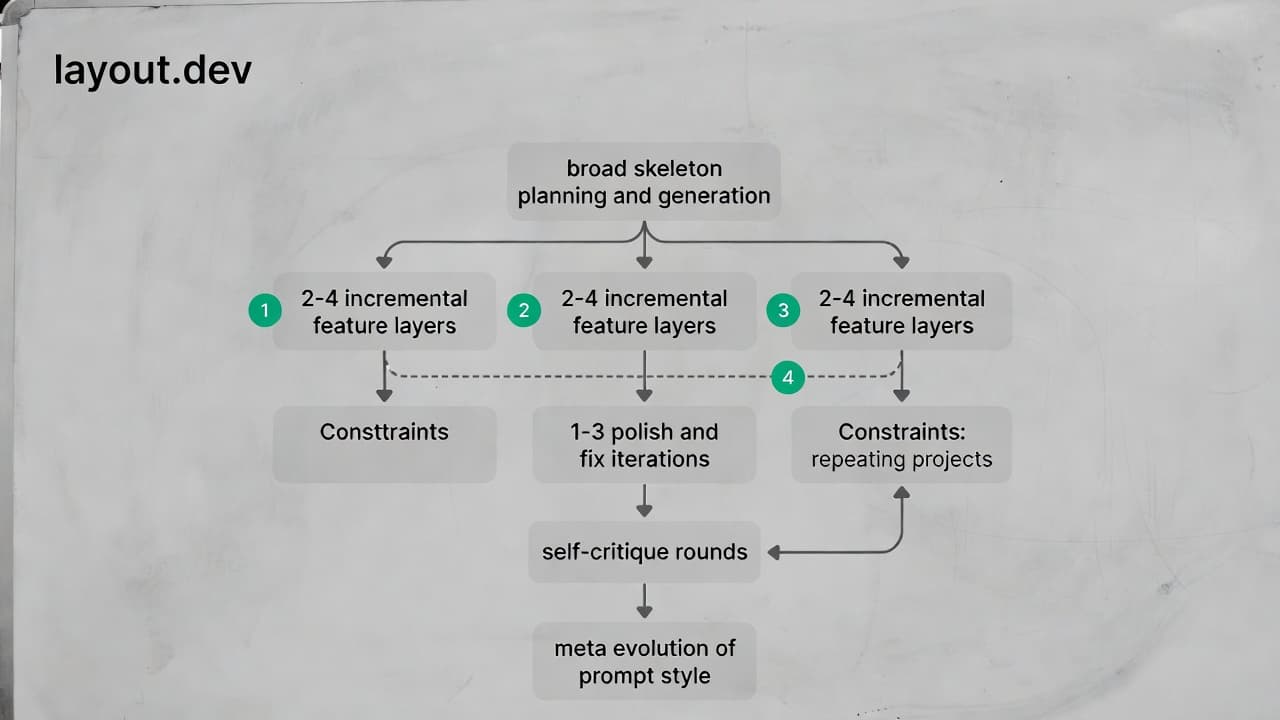
Advanced iterative prompting techniques build directly on basic structured prompting (role, specs, constraints, examples) by turning one-shot generation into a controlled, feedback-driven loop. This is especially powerful for vibe coding platforms like Layout.dev, Bolt.new, Lovable, v0.dev, and similar React/Tailwind-focused builders, where the first output is rarely perfect — but 4–8 targeted iterations can reach near-production quality.
These methods come from real-world 2025–2026 practices in AI-assisted development: stepwise refinement, self-critique loops, planning-first, recursive improvement, and hybrid reasoning patterns. They reduce hallucinations, fix logic/UI bugs faster, and help you ship cleaner prototypes.
Core Principles for Iterative Success in Vibe Coding
Before diving into techniques:
- Treat each generation as draft 0.1 — never expect perfection upfront.
- Keep iterations short & surgical (1–3 changes per prompt) to avoid context overload.
- Always reference prior output explicitly: "Using the previous prototype you generated…"
- End strong iterations with self-evaluation prompts to decide whether to continue or export.
- Track your best iteration chains in a personal note (many users maintain "prompt playbooks").
1. Stepwise / Incremental Build (Most Used in Practice)
Break the app into layers and build bottom-up or feature-by-feature with explicit feedback loops.
Workflow Example (Layout.dev style):
- Skeleton → "Generate only the main layout structure: header, sidebar, main content area. Use React + Tailwind, responsive, dark mode ready. No functionality yet."
- Review → Preview → "The sidebar is too wide on mobile. Make it collapsible below md breakpoint. Keep everything else identical."
- Add Layer → "Now add the task list component inside main content: grid of cards, each with title, checkbox, delete button. Make cards draggable using react-dnd if possible."
- Polish → "Add hover states, transitions, and loading skeleton for the task list."
Why it wins: Prevents the AI from hallucinating unrelated features; each step validates the foundation. Users report 3× fewer total regenerations vs. monolithic prompts.
2. Plan → Execute → Refine (Chain-of-Thought + Planning First)
Force the AI to think aloud before coding — dramatically better for logic-heavy or stateful components.
Powerful Starter Phrase: "Before writing any code, create a detailed plan:
- List the main React components needed and their responsibilities.
- Describe data flow and state management (useState, useReducer, or Context?).
- Outline potential edge cases.
- Then implement step by step."
Follow-up Iteration: "Review your plan. I see you suggested useReducer but this is simple — switch to useState + localStorage persistence. Now regenerate the code with that change."
Pro Variant (ReAct-inspired): "Think step-by-step, then write code, then simulate running it and report any issues you foresee."
3. Self-Critique & Recursive Refinement Loop
Let the AI grade and fix its own work — one of the highest-leverage 2025–2026 techniques.
Strong Self-Audit Prompt (paste after any generation): "Critically evaluate the code you just generated on these criteria (score 1–10 each):
- Code cleanliness & modularity
- Tailwind usage (utility-first, no custom CSS)
- Responsiveness & accessibility (ARIA, keyboard nav, contrast)
- Performance considerations
- Adherence to my original requirements
For any score <8, explain the weakness and provide an improved version of the affected files."
Recursive Upgrade: "Rewrite your previous self-critique prompt to be even stricter and more detailed for React/Tailwind prototypes, then use it to refine the current dashboard code."
Many users chain 2–3 self-critique rounds before manual edits.
4. Constraint Reinforcement & "Fix Only" Mode
When something is almost right, lock good parts and target surgery.
Examples:
- "Do NOT change the header, sidebar, or overall layout. ONLY fix the task card: add due date badge, priority color stripe, and make delete button red with confirmation dialog."
- "Keep dark mode implementation exactly as is. Improve only typography: use better font pairing, increase heading contrast, apply consistent spacing scale (4px multiples)."
- "Ignore styling. Focus solely on fixing the drag-and-drop bug: cards reset position after drop."
This preserves momentum and avoids "throw away good work" regressions.
5. Meta-Prompting & Prompt Evolution
Use the AI to improve your prompting style mid-session.
Meta Variants:
- "Rewrite this prompt I just used to be 30% more concise, add missing accessibility constraints, and make success criteria explicit: [paste your last prompt]"
- "Analyze the last 3 iterations. What patterns cause bugs/UI regressions? Suggest 3 new rules I should add to future prompts."
- "Create a reusable template for building admin dashboards that incorporates everything we've learned so far in this session."
6. Parallel Exploration (When Stuck)
Generate 2–3 options at once, then merge the best parts.
Prompt Pattern: "Generate THREE different approaches to implement real-time task updates simulation (without actual backend): A) Using setInterval polling B) Mock WebSocket with useEffect C) Simple event emitter
For each: pros/cons table + code snippet. Then recommend the best and implement it in the existing prototype."
Pick winner → "Merge approach B into the current code, replacing the dummy data fetch."
Quick Reference Table: When to Use Which Technique
| Situation | Best Technique | Approx. Iterations Needed | Impact Level |
|---|---|---|---|
| First structure / layout | Stepwise + Planning First | 2–4 | High |
| Logic bugs / state issues | Chain-of-Thought + Self-Critique | 3–6 | Very High |
| Almost good, need targeted polish | Constraint Reinforcement / "Fix Only" | 1–3 | High |
| Repeated regressions on same area | Meta-Prompting + New Rules | 2–4 (then permanent gain) | Very High |
| Choosing between design/approach options | Parallel Exploration | 2–5 | Medium-High |
| Final quality gate before publishing | Multi-Criteria Self-Audit Loop | 1–3 | High |
Final Workflow Recommendation for Layout.dev (or Similar)
- Broad skeleton (planning + generate)
- 2–4 incremental feature layers (stepwise)
- 1–3 polish/fix iterations (constraint + fix-only)
- Self-critique round(s)
- Meta → evolve your prompt style if repeating project type
- Publish when ≥8/10 on key criteria
Master these, and you'll spend far less time fighting the AI and more time validating ideas. What's the next application you're working on?