
Prompt engineering is the core skill that turns "vibe coding" platforms like Layout.dev, Bolt.new, Lovable, v0.dev, and similar AI app generating tools from generic generators into powerful, precise builders. The quality of your output depends far more on how you communicate your intent than on the tool itself.
These platforms (especially Layout.dev with its React + Tailwind focus) reward clear, structured, iterative prompts over vague or overly long ones. Below are practical, battle-tested tips tailored for vibe coding in 2026, drawn from user experiences, comparisons, and best practices across these tools.
1. Start with Role & Persona (Set the AI's Mindset)
Give the AI a clear identity right at the beginning. This anchors its reasoning and style.
- Good: "You are a senior React developer specializing in clean, modern Tailwind CSS UIs. Build responsive, accessible components following best practices."
- Why it works: Tools like Layout.dev generate cleaner, more modular code when the "persona" is defined. It reduces generic boilerplate.
2. Be Extremely Specific & Structured (The #1 Mistake Killer)
Vague prompts = vague results. Use bullet points, numbered steps, or sections for clarity.
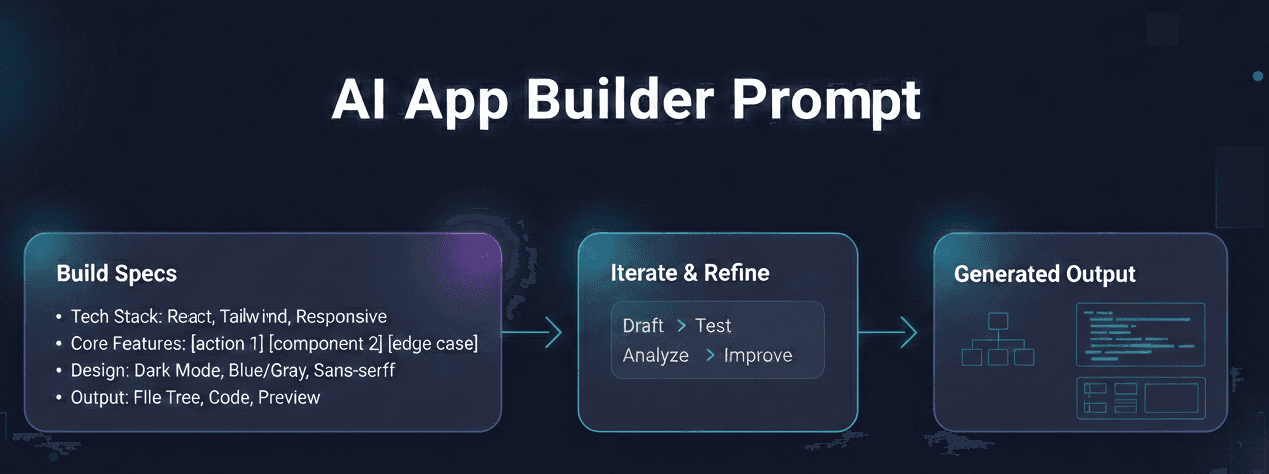
Structure your prompt like this template (adapt for Layout.dev):
Build a [app/component type] with the following specs:

Tech stack:
- React (functional components with hooks)
- Tailwind CSS for styling (no extra libraries unless specified)
- Responsive design (mobile-first, breakpoints at sm/md/lg)

Core features / user stories:
- User can [action 1]
- Include [component 2] with [behavior]
- Handle [edge case]

Design preferences:
- Modern/minimal/dark mode support
- Color palette: primary blue (#3b82f6), neutral grays
- Typography: sans-serif, headings bold

Output format:
- Full project structure (show file tree if possible)
- Clean, commented code
- Live preview-ready
Example for Layout.dev:
"Create a responsive dashboard for a task management app. Use React + Tailwind. Include: sidebar navigation, header with search, main grid of task cards (draggable if possible), add-task modal. Dark mode toggle. Make it mobile-friendly with Tailwind breakpoints."
3. Describe Behavior & "Why" Over Just "How"
Focus on user actions, goals, and constraints rather than dictating exact implementation.
- Bad: "Make a login form with email and password."
- Better: "Users need to securely log in with email/password. Show validation errors inline, disable button during submission, show success toast on login. Prioritize accessibility (ARIA labels, keyboard navigation)."
This helps the AI choose smarter patterns (e.g., proper form handling in React).
4. Use Iterative Prompting (Don't Aim for Perfection in One Shot)
These tools shine with follow-ups. Generate → Review → Refine.
Workflow:
- First prompt: Broad structure (e.g., "Generate the main layout skeleton").
- Second: "Add dark mode toggle to the header using Tailwind's dark: prefix."
- Third: "Fix the card hover effects – make them smoother with transition."
- Fourth: "Make the sidebar collapsible on mobile."
Many users report 3–6 iterations yield production-like quality faster than one giant prompt.
5. Leverage Visual Context When Available
Layout.dev supports image uploads—use them!
- Upload a rough Figma sketch, screenshot, or reference UI.
- Prompt: "Turn this uploaded wireframe into a React + Tailwind prototype. Match the layout exactly, improve typography and spacing for modern feel."
This dramatically reduces misalignment on visual elements.
6. Add Constraints & Guardrails
Prevent common issues (bloat, deprecated patterns, bad accessibility).
- "Use only Tailwind utility classes – no custom CSS."
- "Follow React best practices: no use of class components, prefer hooks."
- "Ensure WCAG AA accessibility: proper contrast, semantic HTML, focus states."
- "Keep bundle size in mind – avoid heavy libraries."
- "No third-party UI kits unless shadcn/ui (preferred for composability)."
7. Request Structured Outputs & Planning First
For complex apps:
- "First, output a high-level plan: components breakdown, file structure, data flow."
- "Then implement step by step."
- "Finally, give me the full code with comments explaining key decisions."
This Chain-of-Thought style improves logic in full prototypes.
8. Platform-Specific Nuances
- Layout.dev (React/Tailwind focus): Emphasize "clean, modular components" and "export-ready project." Ask for "preview-ready" to test interactions immediately.
- v0.dev / Lovable: Lean into aesthetics — "beautiful gradients, neumorphic shadows, premium feel."
- Bolt.new: Great for full-stack iteration — include backend hints like "use Supabase for auth" if expanding later.
Quick Cheat Sheet: Prompt Power Words/Phrases
- "Responsive & mobile-first"
- "Accessible (ARIA, keyboard nav)"
- "Modern & minimal"
- "Use shadcn/ui components if fitting"
- "Include hover/focus states with transitions"
- "Dark mode support via Tailwind dark:"
- "Error handling & loading states"
- "TypeScript types where relevant"
Final Pro Tip
Test small first. Start with one component (e.g., "Generate a pricing card") to calibrate your style, then scale to full pages/apps. Track what works in a personal "prompt library" — copy-paste winners save hours.
Master these, and you'll get far better results from Layout.dev and friends than most users. What kind of prototype are you building next?